Grandstream Phones #
~.Dimensions.~ integrates directly with the Grandstream GDMS service. Any new Grandstream phones added to ~.Dimensions.~ will automatically provision. If adding a phone which has been used previously on another platform, it may need to be reset using the instructions below.
info
Some V1 Grandstream devices are not supported on GDMS and will need to be pointed at ~.Dimensions.~ manually.
Manual Provisioning #
If there are problems with the Grandstream provisioning service or the phone does not support automatic provisioning, you may need to provide the details to the phone manually on how to talk to the ~.Dimensions.~ system.
To complete manual provisioning, you will need the phone's unique provisioning username/password combination from the Device Configuration area.
Log into the phone's web UI and access the 'Advanced Settings' area. Scroll down to the 'Firmware Upgrade and Provisioning' section.
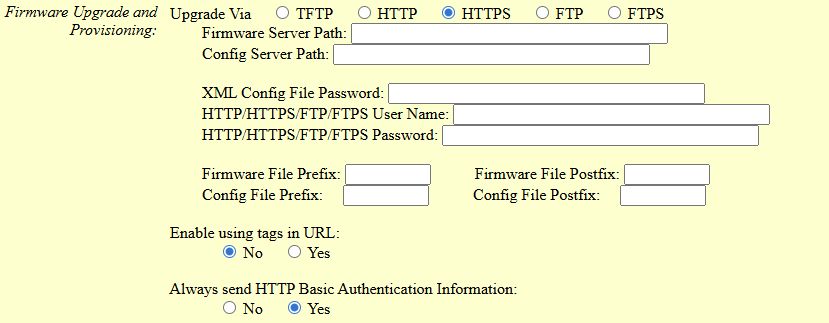
Populate the following configuration items:
- Upgrade via: HTTPS
- Config Server Path: Enter the URL for the ~.Dimensions.~ provisioning server including the sub path but without the 'https://' prefix.
- HTTP/HTTPS/FTP/FTPS User Name: Add the provisioning username
- HTTP/HTTPS/FTP/FTPS Password: Add the provisioning password
- Always send HTTP Basic Authentication Information: Yes
Once all the settings are populated, scroll to the bottom of the page and select 'Update' then 'Apply'.
802.1x #
Supported 802.1x Types:
- EAP-TLS
- EAP-MD5
- EAP-PEAP/MSCHAPv2
EAP-TLS
For EAP-TLS support, the certificates/keys need to be hosted where they can be accessed by URL for the Grandstream phones to download.
Provide URLs for each of the certificates and private keys required in the configuration.
Example
Here is an example of the fields that should be configured in the ~.Dimensions.~ portal for Grandstream phones.
| ~.Dimensions.~ Config | Grandstream Config | Notes |
|---|---|---|
| Identity | P7902 | Specifies the identity or username used for authenticating the phone. |
| Root / Intermediate Certificate | P8439 | It configures the URL for uploading the 802.1x CA certificate. The format of the certificate must be .pem,.crt, .cer or.der. Max URL length 4096 characters. |
| Local Certificate | P8440 | It configures the URL for uploading the 802.1x client certificate. The format of the certificate must be *.pem. Max URL length 4096 characters. |
For more information, check the Grandstream Administrator Guide.
EAP-PEAP/MSCHAPv2
For EAP-TLS support, the certificates/keys need to be hosted where they can be accessed by URL for the Grandstream phones to download.
Provide URLs for each of the certificates and private keys required in the configuration.
Example
Here is an example of the fields that should be configured in the ~.Dimensions.~ portal for Grandstream phones.
| ~.Dimensions.~ Config | Grandstream Config | Notes |
|---|---|---|
| Identity | P7902 | Specifies the identity or username used for authenticating the phone. |
| Password | P7903 | Specifies the password for the identity used for authenticating the phone. |
| Root / Intermediate Certificate | P8439 | It configures the URL for uploading the 802.1x CA certificate. The format of the certificate must be .pem,.crt, .cer or.der. Max URL length 4096 characters. |
For more information, check the Grandstream Administrator Guide.
EAP-MD5
For EAP-MD5 support, populate the 'Identity' and 'Password' fields in the phone's configuration or customer-wide configuration.
Custom Configuration Files #
The addition of custom configuration files is supported for Grandstream phones. Grandstream configurations are flat XML files.
The example below shows how to disable the receiver off-hook tone.
<P4794>1</P4794>Any XML items included here will be combined with the configuration sent to the phone.